

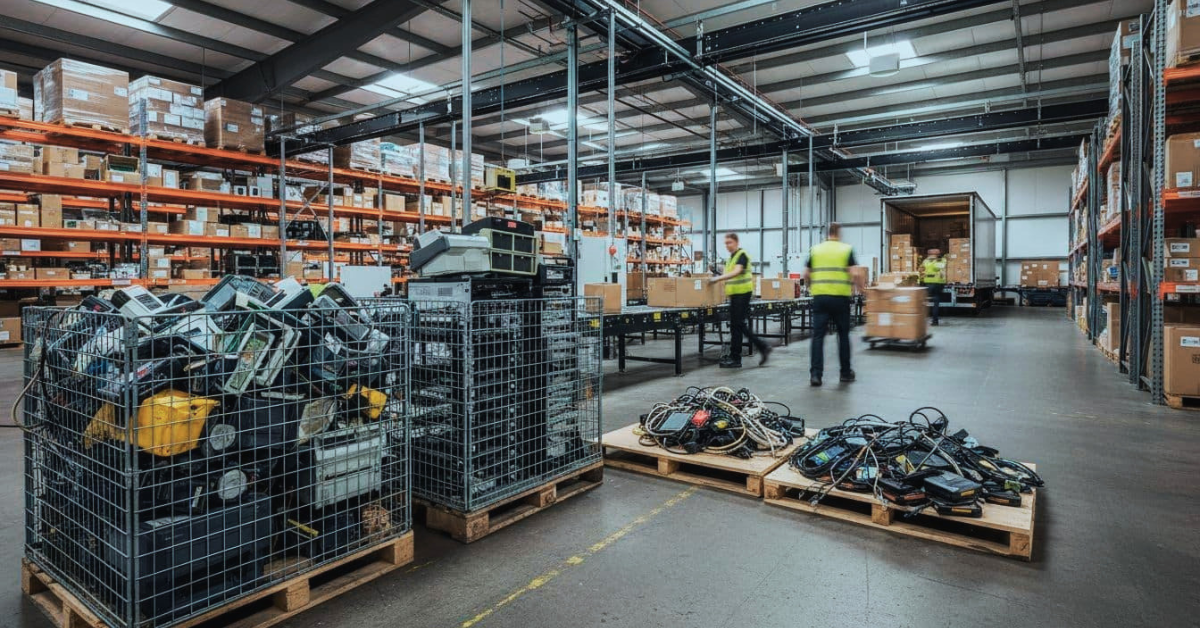
Walk a busy fulfillment center floor for five minutes, and you’ll see it: scanners chirping, tablets bouncing between carts, label printers spitting nonstop, workstations logged in all day, Wi‑Fi gear mounted overhead, servers humming in a closet, and even payment devices for will-call pickups or returns.
Now look behind the scenes. Devices fail, get upgraded, or get replaced fast, and the old gear quietly stacks up in cages, IT closets, and half-wrapped pallets near the dock. That’s the hidden side of eCommerce device disposal.
For operations leaders, this matters because storage space is money, clutter creates safety issues, and audits don’t care that “we’re too busy.” Uptime and brand trust are on the line, too. If you’re searching for warehouse electronics recycling Seattle Bellevue, you’re already feeling the pressure. The good news: a simple bulk pickup plan with secure data handling and tracking can turn a messy corner of the building into a controlled, auditable process.
Why warehouses burn through electronics faster than most teams expect
Warehouses chew through electronics for the same reason they chew through shrink wrap and tape: repetition, speed, and hard use. A handheld scanner might survive an office. In a fulfillment center, it gets dropped, charged twice a shift, and used with gloves in a hurry. Over time, triggers fail, ports loosen, and batteries swell or won’t hold a charge.
Seasonality makes it worse. Peak season brings temp labor, extra shifts, and rushed training. More hands touch the same devices, and damage climbs. At the same time, many sites standardize hardware to cut support tickets, which means “one model in, old models out” happens in waves. Software and security updates also drive refresh cycles, especially when older Android versions stop meeting policy, or a WMS upgrade breaks compatibility with older scanners and printers.
Even without full-blown robotics, warehouses rely on lots of endpoints. Recent warehouse surveys show the reality is still mostly manual. One 2026 snapshot found about 63% of warehouses are fully manual, while 31% are partially automated and 6% are highly automated. In other words, many operations don’t have robots everywhere, but they do have dozens or hundreds of small devices that churn constantly.
Here are the usual suspects that turn into warehouse e-waste:
- Barcode scanners and rugged handhelds
- Tablets and rugged phones
- Workstations, mini PCs, and thin clients
- Monitors and mounting arms
- Label printers and print engines
- Network switches, firewalls, and access points
- UPS units and battery backups
- Servers, storage, and backup drives
- Handheld batteries, docks, chargers, and cords
Returns and shipping promises push wear even higher. More returns mean more relabeling, more scanning, and more station rework. Faster ship windows also mean less time to “be gentle” with equipment, so replacement becomes the default.
Around Puget Sound, it also helps to understand what’s accepted where. For baseline guidance on responsible options, see E-Cycle Washington’s recycling locator.
The quiet inventory problem: old devices take up space and create safety risks
Stored e-waste competes with pick faces, staging lanes, and maintenance space. That spare cage you “borrowed for a week” becomes a permanent museum of dead scanners. Then someone needs that space for peak, and the cleanout turns into an unplanned project.
Safety risks creep in fast. Damaged lithium batteries can overheat, mixed battery types get tossed together, and cords turn into trip hazards. Stacked monitors crack, then glass becomes a handling risk. None of this looks urgent until it is.

Quick signs the problem is getting out of hand:
- Cages overflowing or blocked by random pallets
- “Orphan” devices with no owner, ticket, or label
- Mixed batteries in a tote, especially damaged packs
- Pallets sitting for months near the dock
- No documented chain of custody for retired gear
If you can’t quickly answer “what is it, where did it come from, and what’s on it,” it’s not stored inventory, it’s unmanaged risk.
Where the data risk hides, even in “dead” equipment
A device doesn’t need to power on to be a data problem. Warehouse endpoints often store or cache operational data, like Wi‑Fi credentials, admin passwords, shipping label history, returns notes, and local user profiles. Even “dumb” gear can surprise you, printers with stored jobs, routers with configs, and tablets with saved logins.
Audit pressure makes this real. If you touch payments anywhere on-site (returns desk, will-call, or an overflow POS setup), disposal should support PCI DSS expectations, meaning data must be made unrecoverable when equipment reaches end-of-life. Plain language version: don’t let old hardware walk out the door with recoverable data.
Secure wiping, drive shredding, or degaussing (depending on the device) plus Certificates of Destruction and asset reports reduce that risk. The paperwork also proves you handled sensitive media responsibly, which helps when customers or partners send security questionnaires.
What improper disposal really costs, and why “we’ll deal with it later” gets expensive
Most warehouses don’t ignore e-waste because they don’t care. They ignore it because the day is already full. Still, “later” usually costs more.
First, there’s labor. Someone has to sort the pile, hunt down owners, and decide what’s safe to move. Next comes space cost. A few pallets of old monitors can take the same footprint as fast-moving SKUs. Then there’s downtime. If you wait until a fire inspection, lease audit, or site visit forces action, your cleanout becomes a scramble that steals time from shipping.
Vendor confusion is another silent cost. When nobody owns the process, you get mixed rules: facilities wants it gone, IT wants drives tracked, security wants proof, and finance wants a credit for resale. That’s how a simple disposal task becomes a multi-week email thread.
Recycling also isn’t always free for businesses, especially for mixed loads. Pricing varies by item and region, but many professional programs and contracts land around $0.20 to $0.40 per pound for common, mixed electronics, with different rates for specialty items. When you delay, the bill often grows because the load gets bigger, heavier, and harder to sort. Emergency pickups can add fees, too.
State and local rules add another layer. The US doesn’t have one national landfill ban for all business electronics, but many states push recycling through producer responsibility programs and local disposal restrictions. In the Seattle area, the City of Bellevue’s guidance on unusual item disposal is a helpful example of how specific rules can get.
Finally, recyclers charge for real work: sorting, safe battery handling, dismantling, and managing materials that don’t belong in a dumpster. Treating eCommerce device disposal like a one-time purge usually means you pay the highest price, in dollars and disruption.
Liability reduction: chain of custody, proof of destruction, and clear reporting
Operations teams should expect a short set of documents that make risk easier to manage. At minimum, ask for a pickup manifest that matches what left your dock. If devices have serial numbers and it’s practical to capture them, a serialized asset list is even better.
For data-bearing gear, you want Certificates of Destruction (or verified wipe reports) tied to the load. Then request a recycling summary you can file for ESG reporting, customer questionnaires, or internal audits. Good paperwork turns “we think it got recycled” into “we can prove what happened.”
A practical bulk e-waste pickup plan that works with warehouse schedules
A warehouse pickup shouldn’t feel like a surprise visit from a moving company. It should run like any other dock appointment. Here’s a process that fits real operations:
First, choose a staging zone near the dock, not in the IT closet. Next, do a quick decision split: redeploy, resell, recycle, or data-destroy. Then palletize and shrink wrap so the load moves fast and stays safe. After that, separate batteries if required (especially loose lithium packs). Finally, schedule pickup windows around inbound or outbound peaks, and collect chain-of-custody documents at the handoff.
Most providers offer one-time cleanouts and recurring pickups. Recurring pickups usually win for busy sites because the pile never gets huge. Secure transport and tracking should be standard, and data handling often follows recognized practices such as NIST 800-88 or R2-style workflows (useful reference points when you compare vendors).
For warehouses running a Puget Sound footprint, it’s common to coordinate a single route that covers multiple sites, for example a bulk e-waste pickup Tacoma window that aligns with Seattle-area dock schedules. Local services may also offer pickup, drop-off, and on-site drive destruction for high-sensitivity media.
If you want a security-first, warehouse-friendly option built for retail and fulfillment environments, start with Living Green Technology’s eCommerce electronics recycling services. Then request a bulk electronics pickup for your warehouse or fulfillment center.
How to prep a mixed load fast, without your IT team losing a whole day
Speed comes from simple rules. Use three triage tags: reuse, recycle, data-destroy. Pull SIM cards and remove sticky notes with logins. Bundle docks, chargers, and cables with the device type they support, since loose cords slow sorting and create trip hazards.
Photograph each pallet for your internal record, then assign one dock point person for questions during pickup. Many providers prefer palletized loads because it reduces handling and damage risk. That also means your team spends minutes staging, not hours repacking.
When you should choose on-site drive destruction versus off-site processing
Choose on-site drive destruction when the risk is high. That includes strict customer contracts, identity data, sensitive payment environments, or situations where you want to watch drives get shredded and close the audit loop immediately.
Off-site processing can fit standard endpoints when chain of custody, locked transport, and Certificates of Destruction meet your requirements. It’s often simpler for large volumes, especially when drives are embedded in mixed hardware. Some local vendors offer on-site shredding for HDDs and SSDs, which can reduce anxiety and shorten approval cycles with security teams.
Conclusion
Device churn is normal in fulfillment, but unmanaged piles aren’t. Old tech stacks up quietly, then it steals space, increases safety risk, and creates data exposure you don’t need. A bulk pickup program with secure data destruction and solid reporting turns the problem into a routine dock process.
The next step is simple: request a bulk electronics pickup for your warehouse or fulfillment center. Start with a quick walkthrough of what’s stored, where it sits, and how often pickups should happen (one-time cleanout vs recurring). The fastest wins usually come from making e-waste boring again. Request a regular pickup with Living Green Technology with a free data destruction certificate and a hassle-free cleanout!